Sunday, March 27, 2011

Point and Shoot!

My good old reliable Canon PowerShot A430 camera conked out a couple of weeks back. Since then I have been looking for a replacement.


This old camera had given me tons of memories. Especially those videos I took while learning Biketrials.

When I first took the PowerShot A430 to a Canon's service and repair outlet, I was told by the technician there that the cost of replacing the faulty parts would be better spent on a new Canon camera that came with better specs and feature. He told me to look for a new Canon camera that I liked, and he will give me a discount off the selling price.

Hence, I have been scouting for a Canon camera since. Although my choice was limited to Canon models due to the discount I could get from Canon, I was still gonna look at other camera brands to make sure that I was getting the latest feature set at least... LOL.

My selection criteria were quite basic:
  • It had to be a point and shoot camera. DSLR was an over-kill for my needs :-)
  • High resolution enough for me to get a good print when I needed one.
  • Less than USD300.
  • Small and easy to handle.
Like what was written in this article, Photography on Display, "... part of the enjoyment comes from actually taking the photographs - the process is not only a means to an end, but is part of what makes photography so irresistible for most of us. The end result is always the goal, but actually going out and taking the photographs is definitely part of the fun."

So the camera, in my case is the ability to record a moment in time where I can revisit and share with friends and family over and over again :-)
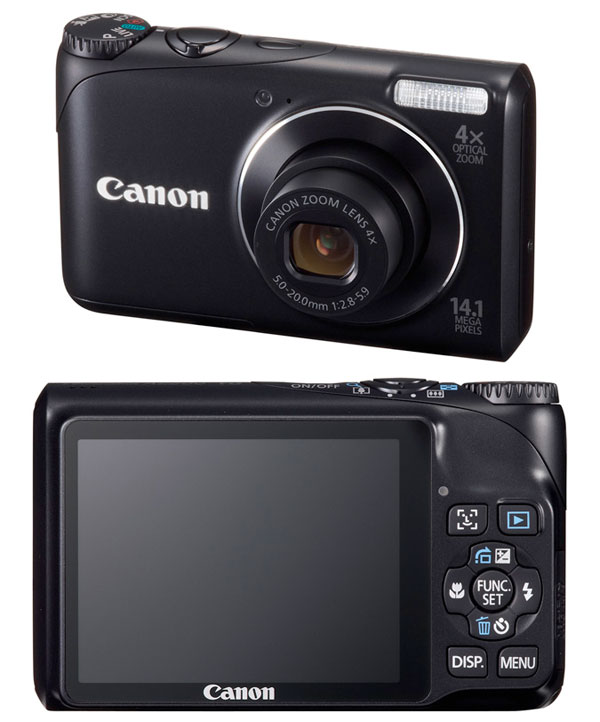

In the end, I found the Canon PowerShot A2200 the most value for money and suitable to my needs :-)

After scouring some photography and camera sites, I decided to stay with Canon and managed to find a model that I liked, the Canon PowerShot A2200. The camera is packed with features that I probably will not use often. Check out the specs here, and it only cost me about USD80 or RM289!

I was advised by a friend (Tiensoon) to consider getting a DSLR. Well, I told him that he is a freelance professional photographer and has a necessity for one. Not me :-) In fact, he should look to further elevate his skills and scope, to even exhibit at a place like the Park West Gallery, (which incidentally, also runs the Park West Gallery Foundation, a non profit organisation that organise and does charitable work for the community).


This is the camera owned by Tiensoon, the Olympus PEN E-PL2, a thing of beauty, but way out of my league... LOL.

As for myself, I shall strive to just point and record memories that I hope one day will tell a tale to my children of the many things I have done or tried to do... LOL.

Monday, October 18, 2010

Gmail Limit Up!

This morning when I logged into my primary Gmail account, I received a warning message stating that I am "almost out of space". I have used up 7150 MB of 7509 MB or 95% of my allocated space.


My Gmail account almost out of space.


I am using 7150 MB of 7509 MB or 95% of my allocated space.

According to my Google Accounts info, my storage were pretty much used up.


My Google Account storage status. I do not know why Gmail is showing 8.42 GB instead of 7509 MB. Any ideas?

As you can see, I have completely used up the 1 GB space allocated to my Picasa Web Albums. The reason was that all videos and photos I uploaded to my blogs were stored on Picasa Web. Learned my lesson after that... :-)

In the end, I transferred ownership of some of my blogs to a new Gmail account and thus a new Picasa Web Album account with a new 1GB quota... :-) From then on, I only used Picasa Web for photos and all my blog videos were uploaded to YouTube.

Purchase Additional Storage

In any case, I was offered to purchase additional storage by Google. I must say that the plans were pretty good.


Unfortunately, I am a frugal elderly Malaysian Chinese and I am duty bound not to pay, unless I totally have no other options... LOL. But you know what, Google even offered to show me how to reduce my email storage without having to subscribe to a new plan... and I intend to follow their tips to the letter... LOL.

This morning, I started by deleting all my newsletter subscriptions. By doing just that, I managed to reduce the email storage to a respectable 6912 MB or 92% of my 7509 MB. I have not begun deleting all my emails with big attachments yet. Well, I will not move to this step until I have exhausted all other avenues first.

Ultimately, the day will come when I will reach the storage limit.... by then, I will probably follow another Google advise to forward all the emails to a new Gmail account :-)

My First Gmail Conversation

Since I started using Gmail back in 2004, I had stopped using any desktop email client (Outlook Express) and my Yahoo! Webmail account.

The oldest email in my Gmail Inbox was dated Thu, Jul 1, 2004 at 1:03 PM (GMT +8). And the first "conversation" I had was with my colleague, George. The conversation showed how excited we were to use Gmail and how impressed we were with the way Google had disrupted email... LOL.


First Gmail conversation with George.

It has been more than 6 years since I started using Gmail. It was and is a good ride. Now I have 6 Gmail accounts and will probably get more when the need arises... LOL. Thanks Google!

Sunday, October 17, 2010

Running Two Firefox Browser Profiles Concurrently

Last week, I was trying to learn how to develop a Firefox extension. One of the things I discovered, that was useful, was that I could create another Firefox profile and use that specifically for development.

So now, I have a "default" profile that I use for my daily work-related stuff and a "dev" profile that I use for researching into developing Firefox add-ons.


When I need to, I just launched the appropriate profile to suit my tasks.

Today, I wanted to launch two sessions of the Firefox browsers as I needed to log in to two different Gmail accounts (one of my many Gmail accounts is reaching the quota and I needed to transfer some of my emails... LOL).

I Googled and found this blog post on how you could run multiple copies of Firefox - http://lifehacker.com/software/firefox/geek-to-live--manage-multiple-firefox-profiles-231646.php

If you don't want to read the entire blog post and want to quickly get going, just do like what I did:

1. Press the "WINDOWS" key and "R".
2. Type in "firefox -P profile_name -no-remote".
3. Press the "ENTER" key.
4. A "Firefox - Choose User Profile" pop-up will appear. You can create a new profile or use an existing one.

Launch as many profiles as you need by following the above steps :-) Btw, I am using Windows 7. So the steps for other Windows versions might be different.

Also, if you like, you can create a Windows shortcuts for each profile you created. Cheers.

A Family and A Fistful of Coupons' Privacy Policy.